Outdoor Pitstop
Help en vragen over Outdoor Pitstop
1. Wat is een pitstop?
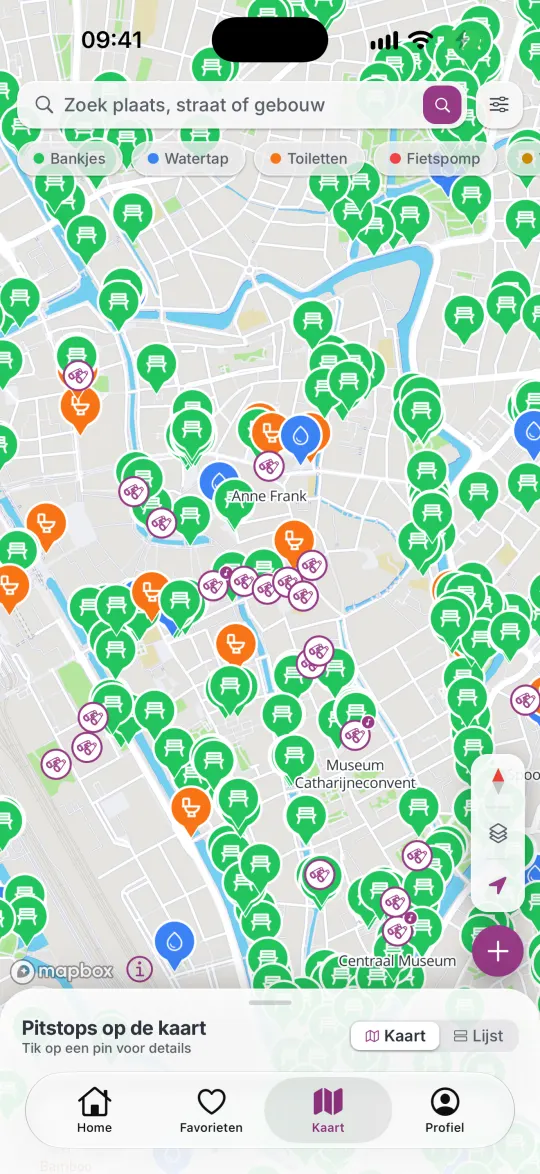
Een pitstop is één plek waar je even kunt stoppen: een bankje, een watertappunt, een openbaar toilet, een fietspomp of een boerderijautomaat. Die vijf soorten noemen we voorzieningen. Op de kaart staan er meer dan 3 miljoen, in 44 Europese landen. Ze komen uit OpenStreetMap, de open kaart van vrijwilligers, en van gebruikers van Outdoor Pitstop.
Bezienswaardigheden met een audioverhaal zijn iets anders. Die herken je aan de verrekijker op de kaart.
2. Hoe voeg ik een pitstop toe?
Tik op Home op Pitstop toevoegen. Je gaat dan door vier stappen: de plek, het type, foto’s en de kwaliteit. Na de foto’s staat je pitstop meteen op de kaart; de vierde stap is je review. Een foto van de voorkant is verplicht, zodat anderen de plek herkennen. Staat er binnen 10 meter al een pitstop van dezelfde soort, dan wijst de app je die aan; daar kun je je foto’s en review kwijt. Je moet ingelogd zijn.
3. Waarom kan ik foto’s en reviews alleen ter plekke plaatsen?
Zodat alles op de kaart klopt. Een foto of review van iemand die er echt was, is betrouwbaarder dan een van iemand op de bank thuis. Daarom kan het alleen binnen 50 meter van de pitstop, of tot 7 dagen nadat je er was. Je bezoek telt als je binnen 50 meter de pagina van de pitstop opende of iets bijdroeg.
Bevestigen dat een plek er nog is, het type en de kenmerken aanpassen en een betere naam of plek voorstellen kan alleen echt ter plekke. Je eigen review later aanpassen kan overal.
4. Wat zijn XP en niveaus?
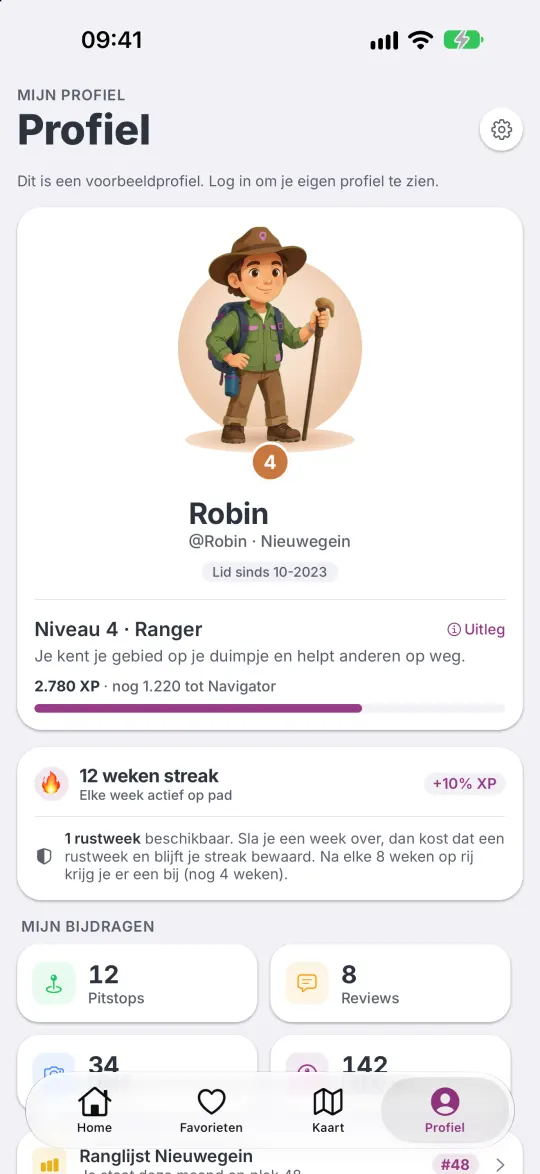
Met elke bijdrage verdien je XP (punten). Bijvoorbeeld: een nieuwe pitstop +50 XP (de eerste keer +100), een foto +15 XP per kant van de pitstop, een review +20 XP, type en kenmerken +5 XP, bevestigen dat een plek er nog is +20 XP, en een duimpje geven of krijgen +5 XP. Met je XP groei je door 10 niveaus, elk met een eigen figuurtje. Verder verdien je patches, houd je een wekelijkse streak vast en maak je elke maand kans op een beker in je woonplaats. Alles staat in de app onder Zo werkt XP.
Onder Verdien punten op Home zie je pitstops bij jou in de buurt die nog een foto, review of controle nodig hebben.
5. Wat is Pro?
Met Pro check je met één tik in bij een pitstop en zie je al je bezoeken op de kaart, ontgrendel je audioverhalen, maak je zoveel lijsten als je wilt, deel je lijsten met anderen, en krijg je 10% extra XP.
Nieuwe gebruikers zijn de eerste 4 weken gratis Pro. Haal je in die tijd niveau 4 (2.000 XP), dan blijf je voor altijd Pro. Pro als abonnement komt later.
6. Hoe deel ik een lijst?
Lijsten delen kan met Pro. Open de lijst bij Favorieten en tik op Lijst beheren. Daar deel je de uitnodiging als link, laat je de QR-code scannen of geef je de code van 8 tekens. Wie meedoet, is eerst kijker. Jij kunt iemand bewerker maken, iemand uit de lijst halen, een nieuwe code maken of de lijst op slot zetten, zodat er niemand meer bij kan.
Kreeg je een code? Vul die in bij Favorieten › Gedeeld met mij.
7. Waarom vraagt de app om mijn locatie?
Om pitstops bij jou in de buurt te tonen, om te controleren of je ter plekke bent als je iets bijdraagt, en om te navigeren. De app gebruikt je locatie alleen terwijl je hem gebruikt. Navigeer je een wandelroute, dan telt hij ook met het scherm uit welk stuk je loopt, tot je stopt. Zonder locatie kun je nog steeds zoeken op een plaats of adres en de kaart bekijken. Meer staat in het privacybeleid.
8. Een pitstop klopt niet. Wat nu?
- Weg? Sta je bij de plek en vraagt de app of hij er nog staat, tik dan op nee. Melden drie mensen ter plekke dat hij weg is, dan verdwijnt hij van de kaart.
- Verkeerde naam of plek? Tik op de pagina van de pitstop op Naam of plek verbeteren. Je kunt de speld tot 50 meter verschuiven. Bevestigen twee anderen ter plekke je voorstel, dan wordt het doorgevoerd.
- Verkeerd type of kenmerken? Pas ze ter plekke aan. De meerderheid van de antwoorden telt.
- Lukt het zo niet? Stuur ons een bericht via het contactformulier, met de naam en plaats van de pitstop.
9. Hoe meld ik een ongepaste foto of review, of blokkeer ik iemand?
Tik bij de foto of review op de drie puntjes en kies Rapporteren. Kies wat er mis is: spam, ongepast, klopt niet of iets anders. Wij kijken er zo snel mogelijk naar. Krijgt een foto of review veel duimpjes omlaag, dan verdwijnt hij vanzelf.
Via hetzelfde menu blokkeer je iemand; je ziet zijn of haar bijdragen dan niet meer. Ongedaan maken doe je in Instellingen › Geblokkeerde gebruikers.
10. Hoe verwijder ik mijn account?
In de app: Profiel › Instellingen › Account verwijderen. Je profiel, foto’s, reviews, lijsten en punten worden direct gewist. Pitstops die je hebt toegevoegd blijven op de kaart, zonder je naam. Dit kun je niet ongedaan maken. Heb je de app niet meer? Vraag het dan via het contactformulier, met het e-mailadres waarmee je inlogde. Meer op Account verwijderen.
11. Waarom kan ik op Android niet inloggen met Apple?
Op de iPhone log je in met Apple of Google, op Android alleen met Google. Je account hangt aan de manier waarop je de eerste keer inlogde. Ben je op de iPhone begonnen met Apple, dan kun je dat account op Android nu niet gebruiken. Ga je wisselen van telefoon, of gebruik je beide? Log dan op de iPhone in met Google. Zit je al vast, stuur ons dan een bericht.
12. Een audioverhaal staat op slot. Hoe luister ik het?
Zonder Pro lees je het begin van het verhaal. Met Pro check je in binnen 100 meter van de bezienswaardigheid. Daarna kun je het altijd terugluisteren, zolang je Pro bent. Is een plek niet open voor publiek, dan kan er een luisterplek zijn in de buurt: daar mag je ook inchecken. Bij plekken waar weinig over bekend is, staat alleen een tekst (een “Verhaal”), zonder audio. De verhalen zijn er in het Nederlands en het Engels.
13. Kan ik meldingen uitzetten, of uit de ranglijst?
Ja. Welke meldingen je krijgt, kies je in Instellingen › Notificaties. Alles uit kan in de instellingen van je telefoon. Uit de ranglijst ga je met Instellingen › Zichtbaar in de ranglijst. Je XP en niveau blijven dan gewoon, maar je doet niet mee voor de maandbekers.
14. In welke talen werkt de app?
In het Nederlands en het Engels. De app volgt de taal van je telefoon; staat je telefoon in een andere taal, dan krijg je Engels. Je kunt de taal per app wisselen in de instellingen van je telefoon. Meer talen volgen later.
Contact
Staat je vraag er niet bij? Stuur ons een bericht via het contactformulier. We lezen elk bericht.
Help and questions
1. What is a pitstop?
A pitstop is one place where you can take a break: a bench, a water point, a public toilet, a bike pump or a food stall. The map has more than 3 million of them, in 44 European countries. They come from OpenStreetMap, the open map made by volunteers, and from Outdoor Pitstop users.
Landmarks with an audio story are something else. You’ll recognise them by the binoculars on the map.
2. How do I add a pitstop?
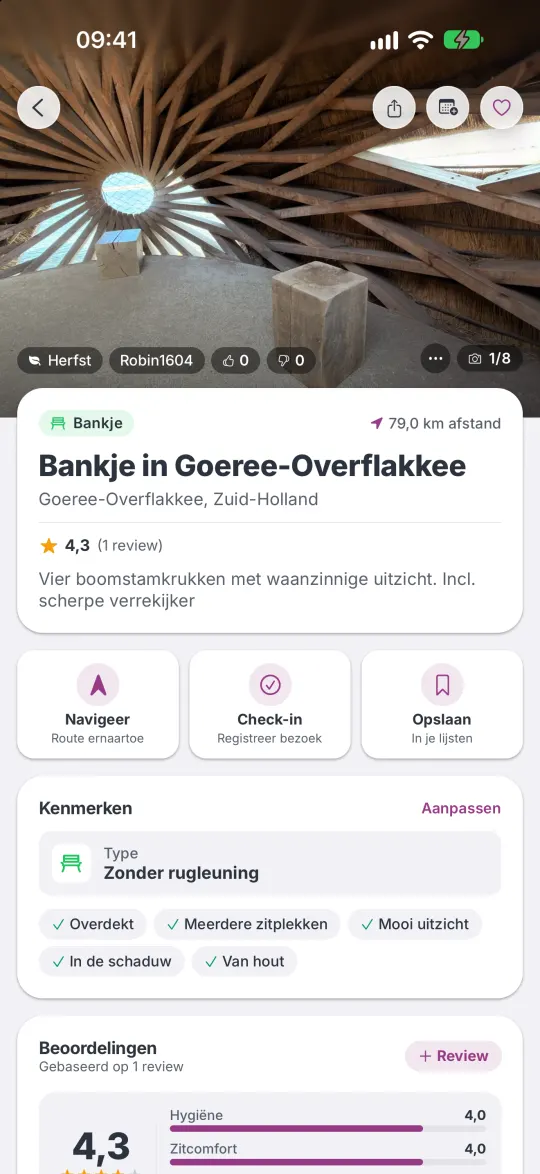
On Home, tap Add pitstop. You then go through four steps: the location, the type, photos and the quality. After the photos, your pitstop is on the map straight away; the fourth step is your review. A photo of the front is required, so others can recognise the place. If there is already a pitstop of the same kind within 10 metres, the app points you to it; you can add your photos and review there. You need to be signed in.
3. Why can I only post photos and reviews on the spot?
So that everything on the map is accurate. A photo or review from someone who was actually there is more reliable than one from someone at home on the sofa. That’s why it only works within 50 metres of the pitstop, or up to 7 days after you were there. Your visit counts if you opened the pitstop’s page or contributed something within 50 metres.
Confirming that a place still exists, changing the type and features, and suggesting a better name or location only work on the spot. You can edit your own review later from anywhere.
4. What are XP and levels?
Every contribution earns you XP (points). For example: a new pitstop +50 XP (your first one +100), a photo +15 XP per side of the pitstop, a review +20 XP, type and features +5 XP, confirming a place still exists +20 XP, and giving or receiving a thumbs up +5 XP. With your XP you grow through 10 levels, each with its own character. You also earn patches, keep a weekly streak going and can win a monthly trophy in your home town. It’s all in the app under How XP works.
Under Earn points on Home you’ll find nearby pitstops that still need a photo, review or check.
5. What is Pro?
With Pro you check in at a pitstop with one tap and see all your visits on the map, unlock audio stories, create as many lists as you like, share lists with others, and get 10% extra XP.
New users get Pro free for their first 4 weeks. Reach level 4 (2,000 XP) in that time and you keep Pro forever. Pro as a subscription is coming later.
6. How do I share a list?
Sharing lists is a Pro feature. Open the list under Favorites and tap Manage list. There you can share the invitation as a link, let someone scan the QR code or give them the 8-character code. New members start as viewers. You can make someone an editor, remove someone, create a new code or lock the list so nobody else can join.
Got a code? Enter it under Favorites › Shared with me.
7. Why does the app ask for my location?
To show pitstops near you, to check that you’re on the spot when you contribute, and to navigate. The app only uses your location while you use it. When you navigate a walking route, it also counts which stretch you walk with the screen off, until you stop. Without location you can still search for a town or address and browse the map. More in the privacy policy.
8. A pitstop is wrong. What now?
- Gone? If you’re at the spot and the app asks whether it is still there, tap no. When three people on the spot report it gone, it disappears from the map.
- Wrong name or location? On the pitstop’s page, tap Improve name or spot. You can move the pin up to 50 metres. When two others on the spot confirm your suggestion, it’s applied.
- Wrong type or features? Change them on the spot. The majority of answers counts.
- Doesn’t that work? Send us a message via the contact form, with the name and place of the pitstop.
9. How do I report an inappropriate photo or review, or block someone?
Tap the three dots on the photo or review and choose Report. Choose what’s wrong: spam, offensive, incorrect or something else. We’ll look at it as soon as possible. A photo or review that gets many thumbs down disappears automatically.
The same menu lets you block someone; you’ll no longer see their contributions. To undo, go to Settings › Blocked users.
10. How do I delete my account?
In the app: Profile › Settings › Delete account. Your profile, photos, reviews, lists and points are deleted immediately. Pitstops you added stay on the map, without your name. This cannot be undone. No longer have the app? Ask via the contact form, with the email address you signed in with. More on Delete your account.
11. Why can’t I sign in with Apple on Android?
On iPhone you sign in with Apple or Google; on Android only with Google. Your account is tied to the way you signed in the first time. If you started on iPhone with Apple, you can’t use that account on Android for now. Switching phones, or using both? Then sign in with Google on your iPhone. Already stuck? Send us a message.
12. An audio story is locked. How do I listen?
Without Pro you can read the opening of the story. With Pro, check in within 100 metres of the landmark. After that you can listen again any time, as long as you have Pro. If a place isn’t open to the public, there may be a listening spot nearby where you can check in too. For places with little known about them, there’s only a text (a “Story”), without audio. Stories are available in English and Dutch.
13. Can I turn off notifications, or leave the leaderboard?
Yes. Choose which notifications you get in Settings › Notifications. To turn them all off, use your phone’s settings. To leave the leaderboard, use Settings › Visible on the leaderboard. Your XP and level stay, but you won’t take part in the monthly trophies.
14. Which languages does the app support?
English and Dutch. The app follows your phone’s language; if your phone is set to another language, you get English. You can change the language per app in your phone’s settings. More languages will follow.
Contact
Question not listed? Send us a message via the contact form (in Dutch, but English messages are welcome). We read every message.