Outdoor Pitstop
Je Outdoor Pitstop-account verwijderen
In de app
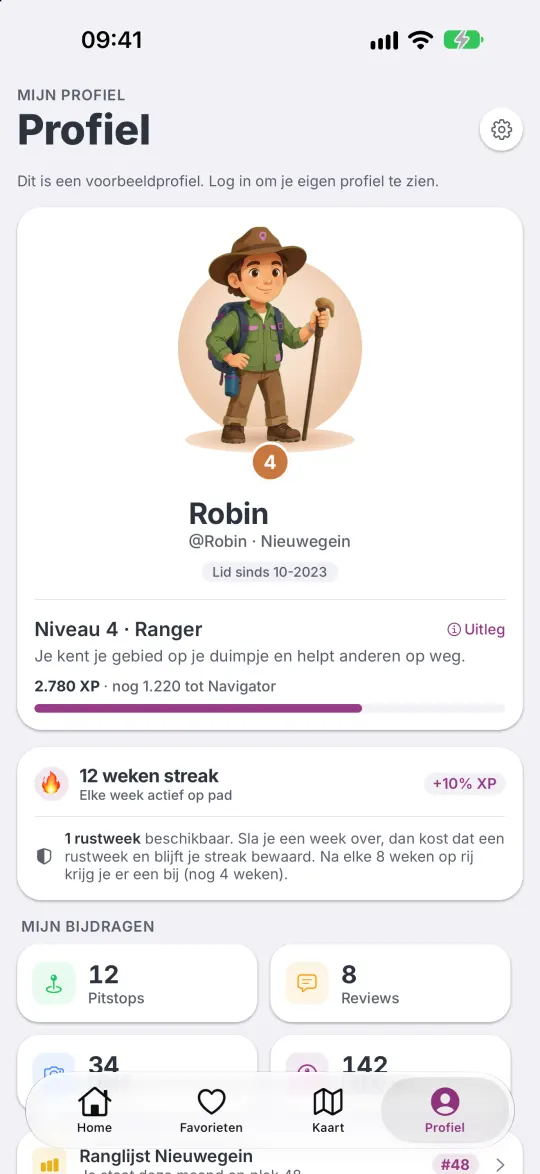
- Open Outdoor Pitstop en tik op Profiel.
- Open Instellingen.
- Tik op Account verwijderen en bevestig met Verwijderen.
- Logde je in met Apple, dan vraagt je iPhone nog één keer om Face ID, om de koppeling met je Apple ID te verbreken.
Je account is dan meteen weg. Dit kun je niet ongedaan maken.
Wat we wissen
- Je account en je inlogkoppeling met Apple of Google.
- Je profiel: voornaam, bijnaam, woonplaats, gender, geboortedatum en profielfoto.
- Alle foto’s die je plaatste, met de plek en het tijdstip van opname.
- Je reviews, duimpjes, bevestigingen en voorstellen.
- Je lijsten. Lijsten van jou verdwijnen ook voor de mensen met wie je ze deelde, en je gaat uit de lijsten van anderen.
- Je check-ins en bezoeken, XP, niveau, streak, patches en bekers.
- Je instellingen, meldingskeuzes, push-tokens, rapportages, blokkades en feedback.
Wat blijft
- Pitstops die je hebt toegevoegd of verbeterd, blijven op de kaart staan, zonder je naam. Zo blijft de kaart compleet voor anderen.
- Notities die je schreef in een lijst van iemand anders, zonder je naam.
- Video’s die je bij een route zette, zonder je naam.
- Onze dagelijkse back-ups bevatten je gegevens nog tot 7 dagen; daarna zijn ze weg.
- Berichten die je via het contactformulier stuurde, staan los van je account. Die bewaren we uiterlijk 12 maanden, of wissen we eerder als je dat vraagt.
Zonder de app
Heb je de app niet meer, of lukt het niet? Stuur een bericht via het contactformulier. Kies het onderwerp Anders, schrijf dat je je account wilt verwijderen, en noem het e-mailadres waarmee je inlogt. Verborg je je e-mailadres bij Inloggen met Apple, noem dan het doorstuuradres van Apple; dat vind je in de instellingen van je iPhone, onder je naam bij Inloggen met Apple.
We kunnen je vragen te bevestigen dat het account van jou is. Daarna verwijderen we je account binnen een maand en laten we het je weten.
Meer over je gegevens staat in het privacybeleid.
Delete your account
In the app
- Open Outdoor Pitstop and tap Profile.
- Open Settings.
- Tap Delete account and confirm with Delete.
- If you signed in with Apple, your iPhone asks for Face ID once more to remove the link with your Apple ID.
Your account is gone straight away. This cannot be undone.
What we delete
- Your account and your sign-in link with Apple or Google.
- Your profile: first name, username, home town, gender, date of birth and profile photo.
- All photos you posted, with the place and time they were taken.
- Your reviews, thumbs, confirmations and suggestions.
- Your lists. Lists you own also disappear for the people you shared them with, and you leave other people’s lists.
- Your check-ins and visits, XP, level, streak, patches and trophies.
- Your settings, notification choices, push tokens, reports, blocks and feedback.
What remains
- Pitstops you added or improved stay on the map, without your name. That keeps the map complete for others.
- Notes you wrote in someone else’s list, without your name.
- Videos you added to a route, without your name.
- Our daily backups still contain your data for up to 7 days; after that it is gone.
- Messages you sent via the contact form are separate from your account. We keep them for at most 12 months, or delete them sooner if you ask.
Without the app
No longer have the app, or doesn’t it work? Send a message via the contact form (it is in Dutch). Choose the topic Anders (Other), write that you want to delete your account, and give the email address you sign in with. If you hid your email address with Sign in with Apple, give Apple’s forwarding address; you’ll find it in your iPhone’s settings, under your name at Sign in with Apple.
We may ask you to confirm that the account is yours. We then delete your account within one month and let you know.
More about your data in the privacy policy.